
|
Mac OS X 10.8 Mountain Lion and OS X Mavericks offer an inbuilt dictation feature that is powered by the same underlying technology as Dragon Dictate. As a result, the dictation commands are nearly identical (see Apple Help document “Mac Basics: Dictation” at http://support.apple.com/kb/HT5449 for the list of supported dictation commands in OS X). The inbuilt dictation feature is readily accessible using the convenient shortcut “Fn Fn” and is great for short-dictations. In Mac OS X 10.8, the dictation works by communicating with Apple’s speech recognition servers over the Internet which may result in an annoying lag between when you speak and when the dictated text appears. In Mac OS X Mavericks, you have the option to turn on "enhanced dictation" which does not require an Internet connection and allows you to dictate continuously. The graph below presents dictation speed & accuracy in OS X Mavericks against the alternatives: typing fast, dictation in OS X 10.8 Mountain Lion, and Dragon Dictate, the best-in-class dictation software on a Mac. 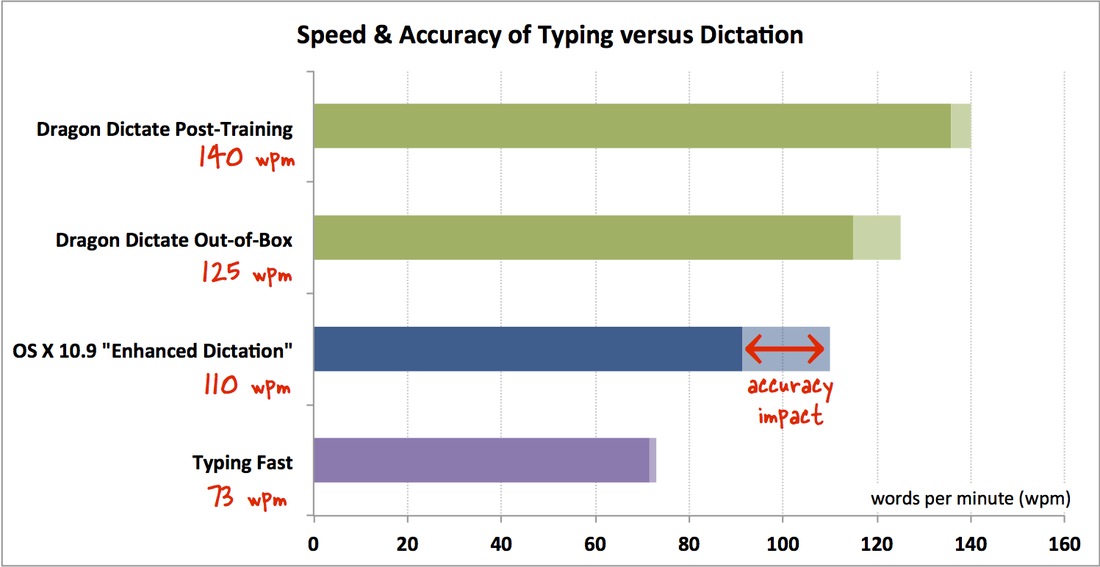 OS X Mavericks inbuilt dictation provides a viable alternative to typing, though it falls short of the speed and accuracy possible using Dragon Dictate. The lightly shaded area on each bar shows the error. OS X Mavericks scores at 110 wpm with 17% error rate.
7 Comments
I have to say in my experience, this is a huge improvement. First off, with DragonDictate you have to wait half a millennia for the software to load up and then to process your speech profile. The double fn key is instantaneous and even on a mediocre connection, the Apple server response is quite good and accuracy for me so far is at least as good if not better than DragonDictate. Plus another annoyance is that regardless of what you do, after a while, DragonDictate drags down to a crawl and becomes essentially unusable without the reloading the software and eventually requires a reboot of the whole machine because of whatever memory management issues clog up the works. This is much better.
onekerato
10/24/2013 03:08:00 am
Notice how OS X Mavericks dictation goes back over what it just typed, and improves the recognized words? Probably takes into account your whole sentence to get better context for what you're likely saying. Dragon Dictate can't do that.
P Haine
11/1/2013 12:31:20 pm
That's not quite right. Dragon definitely looks at the whole context of what you said to resolve earlier words. It just does so without showing you its intermediate guesses. Yes, Dragon does take into account the sentence dictated thus far to come up with the best alternative for the "current phrase". But, it doesn't go back and fix earlier parts of the sentence. OS X Mavericks on the other hand, seems to go back over a couple of "previous phrases" to fix it. Dragon provides the Recognition Window for you to manually fix previous phrases, but OS X Mavericks does it for you automatically.
Jeff N
11/4/2013 04:53:20 am
But what about the continuing issues of Mac Dictate moving the cursor at will or cutting out words or phrases when you try to replace one word. Dragon Dictate requires users to follow the "Golden Rule" or at least "cache the document" explicitly if you're mixing keyboard/mouse input with dictation to avoid quirks like the runaway cursor. But this is par for the course when it comes to any $100+ pro-level software such as Excel, Photoshop, or FCPX - you're expected to learn & follow the rules so the software works as designed. 5/19/2015 02:11:29 am
Im glad I read this blog post before buying dragon dictate. Your comment will be posted after it is approved.
Leave a Reply. |
Archives
March 2021
Categories
All
|

 RSS Feed